

Up to this point, we’ve focused on collecting plaintext card data and using it with payment service providers (PSPs). This includes collecting primary account numbers (commonly referred to as PANs or raw PANs), which are the long numbers on each card that identify the issuer, card holder, etc. While collecting and using raw PANs is common, there are other options to consider. We commonly see Apple Pay, Google Pay (both digital wallets), and network tokens so we’ll focus on those.
These payment methods work a little differently. They use card data that’s already tokenized (more on the token type in a moment). Tokenization isn’t necessarily new. If you integrate directly with any PSP, they’ll likely provide you with tokens that represent card data which you use to charge customers. The difference with Apple and Google Pay is that you don’t have to go through the process of tokenizing raw card data because it’s already done. When customers set up their wallets, they have to enter their card details, and you can use the pre-existing token for payment. This reduces your exposure to cardholder data (CHD), which comes with a reduced compliance burden.
Having more payment methods means more ways for customers to make purchases, and digital wallets are especially great for reaching customers that are hesitant to enter raw card information, or just want a faster checkout experience. They also provide additional ways for customers to authenticate themselves (biometrics, etc.), which can help with conversion.
The tokens that Apple and Google Pay use are actually network tokens. You can work with these tokens through digital wallets, or collect card information and then use it to create network tokens.
From a high level, network tokens may not seem different from traditional tokenization. A customer enters their card details and a token representing their card information is created. There are some subtle differences though, and they make a meaningful impact on accepting payments.
Network tokens are created by card networks (Visa, Mastercard, etc.), not a PSP. PSPs and orchestrators may have network token APIs, but these APIs are hooked into the card networks to create the actual token. Network tokens have a different structure (additional metadata) than traditional tokens, and they’re connected to an individual merchant and device. These factors have some benefits.
We’ve written extensively about network tokens, so if you’re evaluating them now or want to understand how they work, we have you covered.
Many businesses collect raw PANs and offer Apple and Google Pay alongside their other payment methods. Technically, Apple and Google Pay still use cards as the underlying payment mechanism. They just use network tokens to coordinate the payment.
Most PSPs and third parties (like Evervault) provide Apple and Google Pay integrations, or you can integrate directly with Apple and Google. Either way, the UI element looks pretty similar.
With network tokens, you’d generally collect card information using a solution similar to what you use for tokenizing or encrypting card data already (an iframe or hosted payment page). Instead of encrypting or tokenizing it, you create a network token using a PSP or a company like Evervault. You can then use that network token to charge the card.
Network tokens were introduced in 2014 as an alternative to PAN collection and tokenization. Some card networks have set a goal of having 100% adoption by 2030, and this process is ongoing. Issuer support in larger markets like North America and EMEA is around 90%+, but it can be much lower in emerging markets. Because issuer support isn’t at 100%, businesses often implement traditional tokenization to use as a fallback if an issuer doesn’t support network tokens. Having both options also allows you to retry payments if one method fails.
You have a few options for integrating Apple and Google Pay. Most solutions support mobile app integration (Apple for iOS apps, Google Pay for Android), as well as the web. The main decision revolves around integrating directly with Apple and Google, or using a third party.
| Option | Summary | Tradeoffs |
|---|---|---|
| Integrate directly with Apple and Google | Full control | High operational burden: you have to manage certificates, PCI risk, and cryptograms |
| Integrate with a PSP | Easy to set up if you’re using a single PSP | Locked into that PSP, limited routing, poor metadata |
| Integrate with a token vault | PSP-agnostic | Manual onboarding, no PSP registration, higher latency, coupled to vault product |
Integrating directly comes with some challenges, and it’s a manual process that’s error prone, especially at scale. You have to create, upload, and manage merchant identity certificates with Apple, and payment processing certificates with Google. These certificates expire (generally every 12-24 months), which requires you to either manually update them or build automation that does it. If certificates expire without you noticing, Apple and Google Pay transactions can fail without any visible error. This can result in lost revenue and frustrated customers.
To use Apple and Google Pay, you have to create Apple Developer and Google Pay Merchant accounts. You also have to manage domain verification, which requires uploading .txt or .well-known files to your servers for each domain you want to use Apple and Google Pay on. Apple has strict domain validation that fails if the setup isn’t done exactly to their specifications.
We won’t cover the entire integration process, but on the backend you need to implement flows to process payloads from Apple and Google Pay. There might be some similarities in the kinds of fields and data types, but Apple and Google have their own specifications that you need to adhere to. You’ll also need to manage device-specific behavior, especially for mobile.
On the compliance side, there’s some variance as well. On mobile, Apple and Google return a Device Primary Account Number (DPAN), which is PCI-exempt. With Google Pay on the web, Google sometimes returns the raw PAN, which if not handled properly, can increase your PCI scope.
PSP integrations have a lot of the same tradeoffs we covered previously for card collection. The PSP owns the card data, and you can’t make preauthorization or routing decisions like blocking prepaid cards, or applying dynamic pricing. If you only work with a single PSP, this could be a good solution for you. If you want to use multiple PSPs though, this option isn’t ideal. You’d have to integrate each PSP’s Apple and Google Pay solution, which means if you have 5 PSPs, you essentially have 10 integrations to do. And you’d only be able to make PSP routing decisions before you know anything about the card. After the card is collected through a PSP, it has to be used with that PSP to complete the transaction.
Using a token vault provider allows you to decouple your Apple and Google Pay integrations so you can use them with multiple PSPs. This comes at the cost of control (they store the card data) and higher latency on transactions. With vault providers, you use their Apple and Google integrations to collect card information, and they store the data in their vault. When you want to charge a customer, you call the token vault, they do a database lookup, and then share the payment information with your PSP. That process adds latency to every transaction because there are more network calls, as well as the database lookup. Token vaults are also difficult to migrate off of. Support varies and if for some reason card data can’t be migrated, you’d have to collect wallet information from customers again.
On the frontend, you use our integrations to display the Apple and Google Pay buttons. When a customer makes a purchase, we return an encrypted network token and other metadata which you then use to charge the customer. You can also store that encrypted data for later use. If you decide to store it and charge a customer later, you send a single request. There’s no database lookup like there is with PSPs or vault providers. When you make the request, Evervault’s secure network proxy decrypts the payment information and sends it to whatever card network or PSP you want.
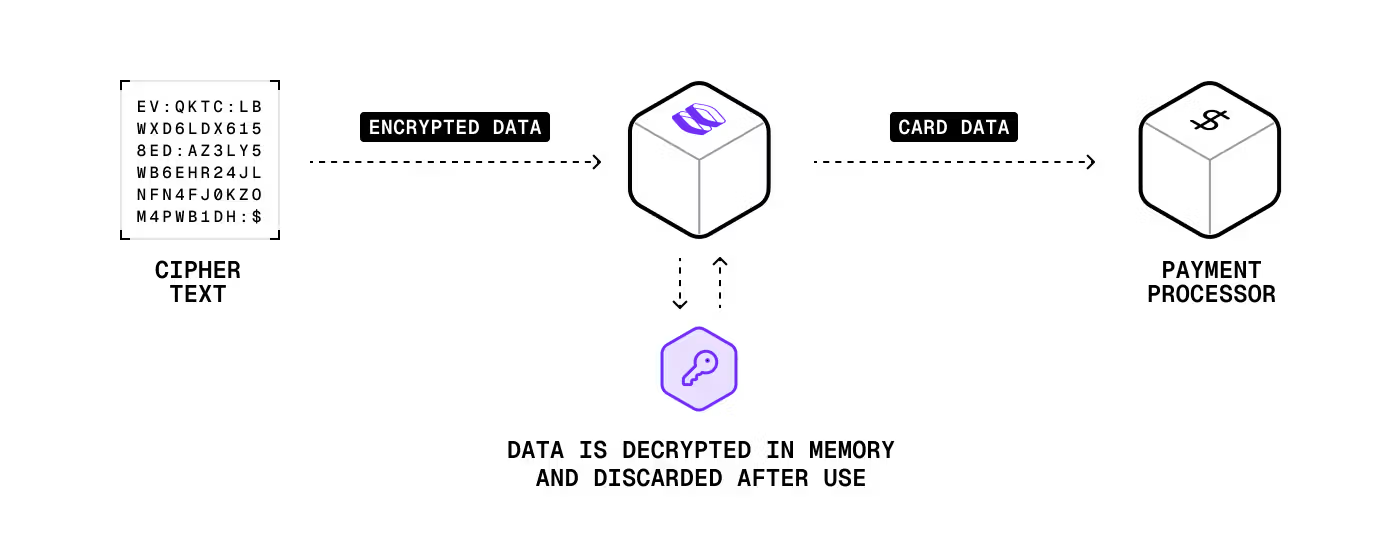
Our solution is multi-PSP from the start. Like the benefits covered previously, you can get full access to BIN data, including the card type and brand, before authorization. This means you can route payments however you want based on fraud risk, fee optimization, etc. And unlike integrating directly with Apple and Google, you don’t have to register as a PSP. Evervault is already registered with both platforms so you don’t have to.
Apple and Google Pay were always part of our plan. Network tokens was a new concept for some of us so we’re still working out how to support them. With the mandates from the card brands, and the additional options it gives us for routing payments and increasing acceptance rates, we’ll likely figure out a solution to support them.
This content is for general information and educational purposes only. It shouldn't be taken as legal, compliance, or tax advice. Evervault doesn't guarantee the completeness or accurateness of this content, and you should always consult with a lawyer, qualified security assessor (QSA), accountant, or similar professional for advice on any of the topics covered.