

Accepting Card Payments
Options for collecting card data
Our last piece introduced the Payment Card Industry Data Security Standard (PCI DSS) requirements, along with the impacts of working with card data. That content laid the groundwork for this next piece. Your compliance requirements under those standards are heavily impacted by how you collect and work with card data. We’re going to cover some of the main options for ecommerce flows, the pros and cons to each, as well as the impact they have on compliance requirements. If you need to support offline, card-not-present transactions (mail orders, telephone orders, etc.) or other flows, you’ll likely need a separate implementation and compliance strategy.
GetLost commentary
As in previous chapters, you’ll see callouts like these that we’ll use to provide commentary from a business’s point of view. This fake company is called GetLost, and they’re an online travel agency (OTA). They’re still in the “build phase” and don’t have a live product yet. They’re evaluating their options for collecting and using card data, and they know PCI DSS will apply to them in some way, but they don’t know to what extent yet. They want to understand their options for collecting and using card data, and the compliance implications of those options.
What to consider upfront
Your biggest consideration is whether you’ll use multiple payment service providers (PSPs). PSPs are companies like Stripe and Adyen that manage most of the payment process. Deciding whether to use multiple PSPs has cascading impacts on other elements, like payments routing, integration complexity, and compliance requirements. Before you make this decision, you should understand why using multiple PSPs is beneficial.
Multi-PSP benefits
With multiple PSPs, you can:
Offer more payment methods.
Optimize payments routing to better serve specific countries and markets, reduce costs, and improve acceptance rates.
Add redundancy and avoid system outages.
Most PSPs support card payments through the major networks, but there’s a broad range of local and region-specific payment methods (ACH in the US, Bancontact in Belgium, etc.) that not every PSP offers. Using multiple PSPs allows you to fill these coverage gaps and offer payment methods familiar to customers. This helps with conversion, and when a payment method is supported by multiple PSPs, you can route transactions to the PSP with the lowest fees or the highest acceptance rates. This can save both you and your customers money.
If you use a single PSP and they go down or cease operations, transactions stop. You can’t accept payments and customers may lose trust in your business. If you operate in a high-risk industry or have high fraud rates, PSPs may pause or stop processing transactions for you so that their chargeback rates remain low. In a multi-PSP setup, if any of these events occur, you can instantly reroute transactions to other PSPs so there’s no downtime. This prevents lost revenue and is a much better customer experience.
Multi-PSP options
If you decide to use multiple PSPs, it introduces a second layer of decisions because not every multi-PSP setup is equal. There are different approaches to using multiple PSPs, each with its own pros and cons. You can:
Integrate with PSPs directly, using their products for card collection and processing.
Integrate with a payment orchestrator that routes payments to PSPs they support.
Use a tokenization or encryption platform to collect card information, and then route payments to your PSPs for processing.
Collect card data yourself and then route payments to PSPs for processing.
All of the options support multiple PSPs, but they don’t all prevent PSP lock-in, which we’ll cover now.
Avoiding PSP lock-in
When you use a PSP to collect card data, it can only be used through that PSP. It’s “locked in”, and you can’t, for example, send that card data to a different PSP to process a payment. Depending on the provider, you might be able to forward card data to downstream partners, but you’re still locked in to your PSP in terms of payment processing. If you did want to use another PSP, you’d need to recollect card data from the customer using that PSP’s system. That’s not a great customer experience, but PSP lock-in also means:
No retries: If one PSP fails, you can’t set up automatic retries on another PSP without recollecting the customer’s card information.
No opportunity to optimize routing: When you use a PSP to collect card data, it ties each transaction to that PSP, and you have no upfront information about the card. This means you can’t make optimized routing decisions, although you might be able to use other information like the customer’s location to do some basic routing. For example, you could send US-based transactions to your PSP with the highest acceptance rates in the US. However, you couldn’t use the card’s type, issuer, and segment to optimize routing any further. This is why decoupling card collection from your PSP is so impactful.
Decoupling your card data
When you collect card information outside of any one PSP, you get more control over payments routing. Support varies (we’ll cover what the different options enable later), but some solutions allow you to do things like BIN lookups to figure out where a card was issued, who issued it, what type of card it is, etc. All of this metadata can be used before payment authorization to effectively route transactions in ways that reduce fees and increase acceptance rates.
You can also configure retry logic to smoothly reroute failed transactions to different PSPs. This is valuable when there’s an outage or if a PSP’s system is down. From a customer’s perspective, they may not even know the initial attempt failed because you can retry the transaction with a different PSP before displaying a receipt or an order confirmation page.
All of these benefits would usually require you to handle card data directly. With a third party like Evervault, you get all of these capabilities while still minimizing your PCI requirements, as solutions like ours ensure raw card data never touches your infrastructure.
Comparing the options
We’ll cover each option in detail, but there’s a snapshot below. Because solutions and implementations vary, it’s difficult to provide specific values on the number of controls required, or the precise compliance scope for each option. From an Evervault user perspective, the lowest compliance scope we generally see for merchants is around 27 controls, and for service providers it’s around 60. We’ll still try to give you an idea of the PCI scope, but know that these are generalizations and may not reflect your situation.
Option | Integration effort | PCI scope | Pros | Cons |
|---|---|---|---|---|
PSPs | Low to medium | Low to medium | Short or medium launch timeframe depending on implementation | Stuck with PSP’s UX, low customization options, PSP lock-in, can’t use card data outside of PSP |
Payment orchestrators | Low | Low | Short launch timeframe, no-code payments routing | Stuck with their UX, low customization options, limited use of card data outside the orchestrator, limited to payment methods and PSPs they support |
Encryption or tokenization platforms | Medium | Low to medium | Full UX control, multi-PSP (avoids PSP lock-in), low risk of breach | Longer launch timeframe |
Build your own collection and storage systems | Very high | High | Full control over UX, full control over card lifecycle, full control over card infrastructure | Very high cost, hugely resource intensive, long launch timeframe, full PCI compliance, SAQ-D or Level 1 RoC, greater chance of a cardholder data breach (potentially resulting in fines and disabling payment processing) |
As you evaluate these options, think about:
The level of control each solution provides over the collection flow and appearance
The level of effort to integrate
How much your compliance scope is reduced
From an internal perspective, you might also want to think about:
What your budget is
Your team composition (do you have enough engineers, who owns compliance, etc.)
Timeframe for going live
Maintenance, both at the technical integration level but also for managing the ongoing compliance requirements
The payment methods you want to offer
Whether there are any third parties you need to send card data to
The goal is to find the right balance between these elements so you can ship the best experience for your customers, while remaining compliant with the least amount of effort on your end.
GetLost commentary
From a quick look, we’re probably going to use an orchestrator or a combination of PSPs through an encryption or tokenization platform. We know we need to be multi-PSP from the start, and we also need a solution that lets us integrate with our suppliers and global distribution systems (GDS).
PSPs
PSPs own card collection and they store your customer’s card data. When you want to charge a customer, you create a transaction with the PSP and they coordinate payment. If you integrate directly with PSPs, you can’t do any routing based on card data. You might be able to do location or IP-based routing, but since you don’t have any pre-authorization card data, you can’t route based on the issuer, or any other card information.
Integration perspective
In terms of card collection, solutions generally consist of redirects and checkout forms embedded as iframes into your website. Iframes are not the same as JavaScript forms, which have very different compliance implications. The PCI DSS documentation has specific explanations and guidance related to these solutions if you want to know more.
With redirects, customers click a checkout button or something similar, which then opens a new page hosted by the PSP.
Redirect showing domain switch
When using a redirect, it changes how and where card data is collected. This reduces compliance requirements because it separates card collection from your systems. Customers enter their card details while on the PSP’s domain instead of yours, and you have little connection to that system.
To implement redirects, your engineering team uses the PSP’s API or SDK to define checkout sessions and initiate the redirect. Interfaces vary, but when a customer clicks your checkout button or similar element, something like this runs behind the scenes.
In this example, you specify:
The name of the product
How much it costs
How many the customer wants (quantity)
A page to show customers if the payment succeeds
A page to show customers if the payment fails
When customers finish the checkout process, they’re usually redirected back to your website. Most solutions allow you to specify different pages for successful and failed transactions.
With an embedded solution, you add a piece of code from the PSP to your own site. This is usually an iframe, which is kind of like putting a little screen within your website that shows the PSP’s code. This prevents the domain switch you get with a redirect, and provides a bit more flexibility. From the customer’s perspective, they stay on your site but the form they enter their card details into is contained within the iframe. Iframes can include the entire checkout form or individual fields for the card number, expiry date, etc.
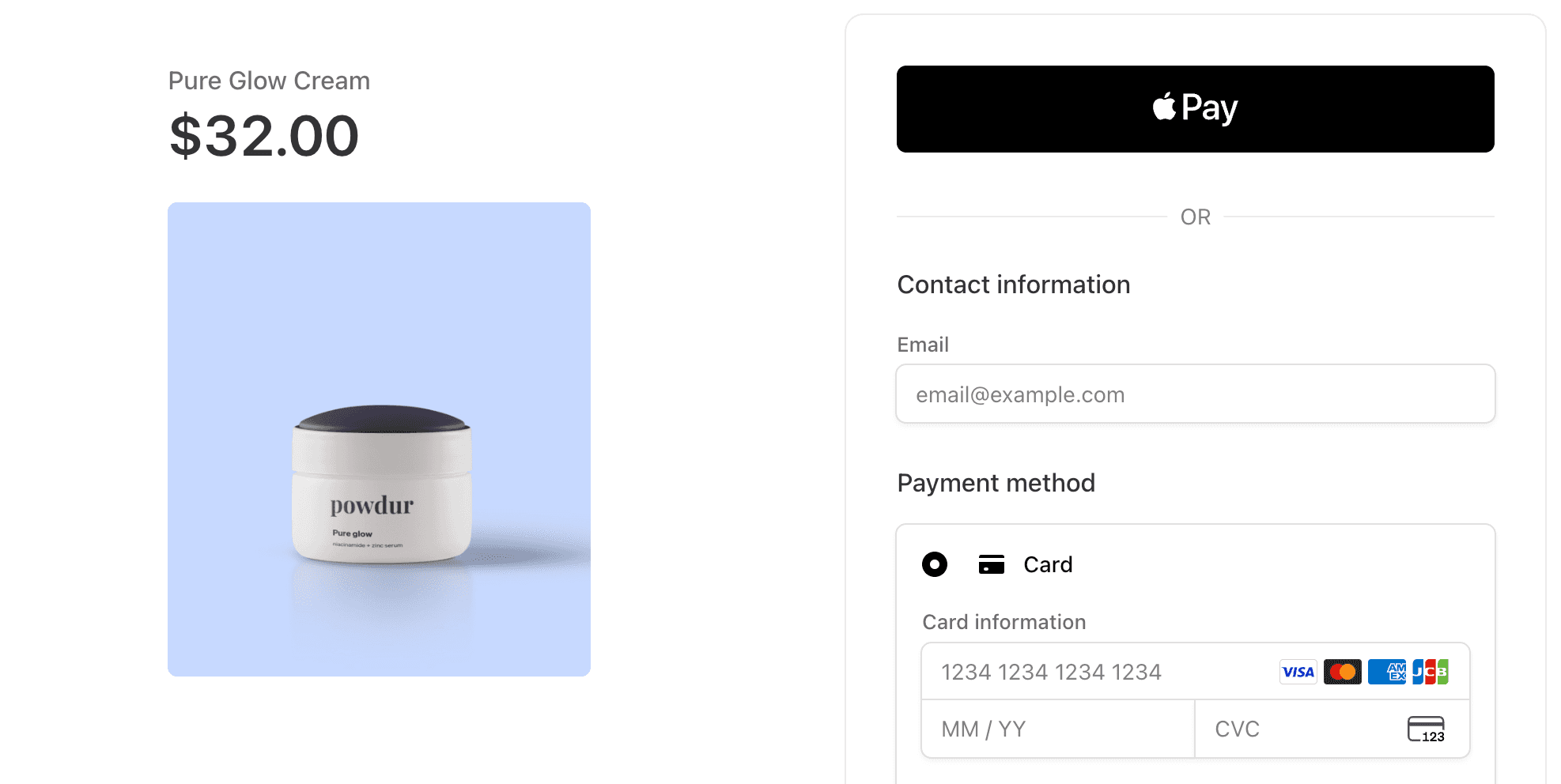
When using iframes, the checkout flow usually has two parts: using an API to create a session, then displaying a checkout form for that session on your frontend. Similar to creating a redirect, you’ll define checkout values for the session using the provider’s API.
The part that’s different is displaying the checkout form within your site. PSPs generally have SDKs and tooling for this, which might look something like the example below.
This uses the session created previously and some additional configuration values to display the checkout form to the customer. There’s of course more to the entire integration (granting purchases, retrying payments, etc.), but this gives you an idea of the work related to the checkout form itself.
Customer experience considerations
The biggest issues are the redirects and lack of customization. Redirects are jarring because customers go from your website, then to the PSP’s to process the payment, and then back to your domain. Some customers may get confused when they’re suddenly moved to another page, which can result in them abandoning transactions all together.
Iframe solutions often provide a better customer experience because you can fit them into your broader site design. Customers also stay within your site during the checkout process, so it’s an overall smoother experience than using redirects.
In terms of customization, many solutions let you set fonts, colors, labels, logos, etc. for the payment form, but there isn’t much you can control after a session is created. Some PSPs support dynamic checkout features, like displaying local payment methods and currencies. These settings are usually configured through the PSP’s dashboard or API, and you’re confined to whatever they allow. For example, you might be not be able to rearrange elements in the checkout form, and there are often limitations on custom fields and metadata (either on the number of fields they allow, character limits, or both).
When PSPs are a good fit
If you only ever want to use one PSP, or you don’t plan to do complex payments routing, a PSP could be a good fit. If you’re light on resources or time, this option could be difficult depending on the exact integration. Migrating from one PSP to another is painful (you have to migrate card data), so if you ever want to switch or add more PSPs, it’s not always an easy process.
While you can technically go multi-PSP by integrating with PSPs directly, it can negatively impact your customer experience. For example, let’s say you have a primary and secondary provider. If you try a transaction with the primary and it fails, and you want to retry that transaction with the secondary, you have to recollect card information from the customer. Or, if your primary has a drop in acceptance rates and you want to switch to your secondary, all customers that entered card information with the primary will have to reenter their information with the secondary.
The other issue is UI consistency. You’d have to integrate each PSP’s card collection product which means your checkout experiences would be different. Those solutions may not have the same level of customization and functionality, which would lead to an inconsistent experience. To integrate directly with PSPs, it’s better to split out card collection (covered previously), which the next options enable.
GetLost commentary
This likely wouldn’t work for us. Customer experience is essential and we want to have a consistent UI for every payment. We also want to do things like dynamic retries and custom payment routing to reduce friction and maximize first-time transaction success. To achieve that, it looks like we’d need to decouple card collection from PSPs.
Payment orchestrators
Payment orchestrators own card collection and they store your customer’s card data. They usually have dashboards for configuring payments routing in the form of decision trees or “if this, then that” statements. When customers submit payments, orchestrators use this logic to route transactions to the PSP you want to use. If you decide to use an orchestrator, make sure they have integrations with the PSPs you need. Not all orchestrators support every PSP, and not every PSP supports every payment method. You want to have the right combination so that you can show relevant payment methods to your customers.
Integration perspective
Similar to PSPs, card collection is usually done through redirects and checkout forms embedded into your website. You usually build the checkout form using the orchestrator’s UI, and add a few lines of code to your website. This requires little-to-no engineering support to implement.
Customer experience considerations
The same concerns we covered for PSPs relating to redirects and lack of customization apply to orchestrators as well, and you’re confined to what they support. Most orchestrators support different fonts, color schemes, etc. for the payment form, but you can’t fine-tune every aspect. Settings are usually done through a dashboard. Custom fields, metadata, and other optional parameters are often supported but have limitations.
Payment orchestrators do provide a unified checkout experience. Unlike integrating directly with PSPs for card collection, you have a consistent checkout experience across customers and payments because you only use the orchestrator’s tooling for collection.
When orchestrators are a good fit
Payment orchestrators are a good fit for less technical users, and for teams that need basic payments routing. Many of their solutions are UI-based and easy to work with, and they consolidate payments reporting in a single place. You can generally go live quickly, without much, if any, engineering support.
Orchestrators have some limitations. You usually build your payment form with their UI, and you’re limited to the customization options they support. For example, you might be able to configure the colors, fonts, etc., but you might not be able to reorder elements in the form or add custom fields.
For routing payments, you use their UI to build workflows or decision trees. The combination of actions (what to do with a payment) and variables (currency, transaction amount, etc.) are limited. You can, for example, set up logic to send all EUR and GBP payments to a certain PSP, or run 3DS on payments from specific countries. Routing like this can be very beneficial, but it can only go so far. For example, Tebex (one of our customers) is a monetization platform for gamers. They tried using payment orchestrators to route payments at the content creator and game level, but couldn’t get it to work. If an orchestrator doesn’t support a certain action, variable, or your own custom metadata, you’re stuck. You can’t customize workflows outside of what the orchestrator supports.
Similar to PSPs, migrating from one orchestrator to another can be difficult. Because orchestrators store your customer’s card information, you need to work with both orchestrators to extract and move the card data.
GetLost commentary
The benefits are pretty clear but we need a lot more control over payments routing. We have engineering resources as well, so we don’t have to work under that constraint.
Encryption and tokenization platforms
Encryption and tokenization platforms separate card collection from PSPs. They collect card information in similar ways (redirects, iframes, etc.), but the card data is either:
Stored and tokenized by the platform, or
Encrypted and then stored by you
You still use PSPs for payment processing, you just provide the card information to the PSP instead of them collecting and storing it. This separation is what allows you to take advantage of all the benefits we covered before in regard to using multiple PSPs, as well as giving you more control over routing payments.
Integration perspective
Most solutions use an iframe or mobile SDK to collect card data within your site or app. With tokenization platforms, you receive tokens that represent card data just like you do with a PSP. The difference is that when you want to charge a customer, you make a call to the platform using the token, they look up the actual card data in their database, and then they share it with your PSP.
With Evervault, the process is slightly different. When customers enter card details, that data is encrypted on the frontend instead of being tokenized.
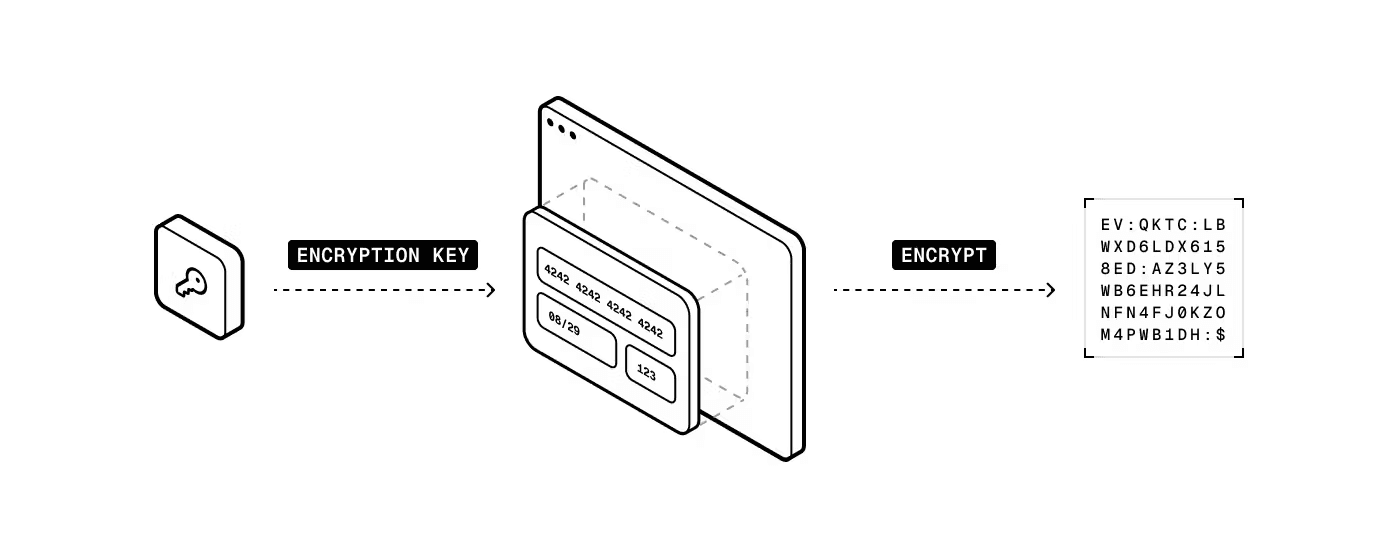
You store the encrypted card data, and when you want to process a payment, you make a call to your PSP through our secure proxy (Relay). Evervault decrypts the primary account number (PAN) and other card information, and then passes it to your PSP.
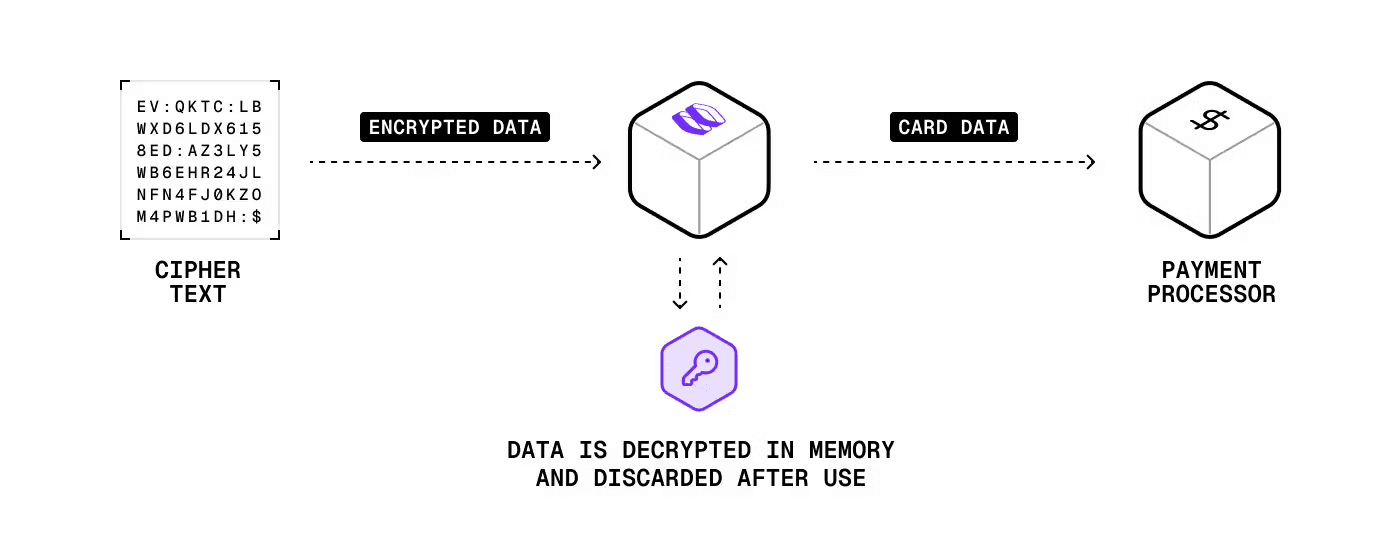
This approach is faster (fewer API calls and no database lookups) and more secure (both you and Evervault need to be breached for card data to be compromised).
Unlike with orchestrators, payments routing is done programmatically rather than with a UI. This lets you write any logic you want to determine which PSP to send a transaction to. This requires more effort from your engineering team, but the level can vary depending on how complex your routing is.
Customer experience considerations
While this solution uses an iframe similar to a PSP, the big benefit is that you have a consistent checkout experience across PSPs. You can still customize the form and blend it in with your site’s design and checkout process. There’s also more of an opportunity to monitor the customer experience end-to-end, which can help uncover friction leading to cart abandonment and other issues.
Styling support varies by provider. Most allow general font, color, and layout options. Some, like Evervault, include localization and full CSS customization as well.
When this solution is a good fit
If you want more control over the checkout flow and logic, and you want to use multiple PSPs, this is likely a good option. With the right solution, it’s a solid balance between compliance burden, integration complexity, and customer experience. If you have a short timeline to go to market, or if you’re very resource constrained, this option may not be a great fit.
For routing payments, you have a lot of flexibility. You can send card data to almost any third party or PSP that has an API. That of course means you need logic for determining where to route transactions, which can increase the level of effort from your engineering team. The benefit of course is that you can optimize routing based on all sorts of factors, like selecting the PSP with the highest acceptance rates for a particular issuing bank. To do that though, make sure your encryption or tokenization platform can provide detailed card information like Evervault’s Insights APIs. You need that information for more advanced routing logic.
How Evervault is different
For many years, tokenization has been the primary approach for collecting and using card data. We’ve detailed the problems with this, and Evervault’s encryption approach is:
More secure (with our dual security model)
Faster (fewer network calls, no database lookups, keys are stored in-memory)
More reliable (active-active infrastructure)
Future proof (if something happens to Evervault or you want to migrate, you can still use your card data)
Because encryption happens on the frontend and you store encrypted card data, you don’t make any calls to Evervault to collect card information. Even if Evervault was down, you could still collect cards. When you initiate payments, you make calls through our secure network proxy to whatever PSP you want. This means our approach is 300-400ms faster than traditional tokenization approaches because:
There are no network calls to retrieve card data
There are no database lookups to find card data so it can be returned to you
This improves overall performance and saves you money. With traditional tokenization platforms, every API call to retrieve card data costs you. Evervault essentially removes those costs because there are no API calls to collect, store, or retrieve data. You only pay when you use the data (charge a customer).
Evervault also gives you more ownership over your card data without increasing PCI scope. Because card data is encrypted and stored outside of a PSP or an orchestrator, you can share it with downstream partners (fraud detection platforms, travel booking systems, etc.) through our secure proxy without working directly with the raw card information yourself.
You might hear claims that encryption isn’t PCI DSS compliant because of PCI FAQ 1086. That’s only half the story though, which PCI FAQ 1233 tells the other half of. Encryption done our way is compliant because there’s no single entity that stores the encrypted data and the decryption keys. With Evervault, you store the encrypted data and we manage the keys, so you still get all the descoping and compliance benefits. On top of that, our approach is more secure than using traditional token vaults. If a token vault is breached, card data is out in the open and can be used. For that to happen with Evervault, both your systems and ours would have to be compromised.
Outside of our encryption approach, Evervault supports data transformation that other platforms and their proxy solutions can’t do. We often see situations where our users need to transform or share card data with third parties in bespoke formats (e.g., extracting and sharing the last four digits of a card number). Without Evervault, users would have to store card data themselves, transform or extract the card information, and then share it with their partners. The problem is that this would increase their compliance scope. Instead, our users build workflows like this with functions. This allows them to perform any logic on raw card information without actually storing or touching the data themselves, so their compliance scope remains unchanged. Even if the actual transformation is trivial, the reduction in effort and compliance burden can be huge.
GetLost commentary
So far, an encryption or tokenization platform is looking like the most likely fit. Our revenue will largely come from bookings, and we need to control payments routing to improve our top line (increase acceptance rates) and bottom line (reduce transaction fees). This option also provides a consistent customer experience and supports multi-PSP. The point about data transformation is interesting. We have to integrate with a ton of suppliers, many of which have legacy or custom-built systems with very specific data requirements.
Build your own collection and storage systems
This option should be the last one you consider. It’s magnitudes more costly in terms of time, resources, initial configuration, maintenance, compliance scope, and risk (security incidents, data breaches etc.). If you’re considering this approach, ask yourself: are there there any business use cases that can’t be fulfilled with a different option? If the answer is no, try one of the other approaches. Even if the answer is yes, it’s worth reviewing those use cases to see how necessary they are.
Integration perspective
Integrations can look vastly different and it’s difficult to provide examples because you’re building so much from scratch. The highest levels don’t change in that you have to collect and store CHD, but now you’re doing it all yourself. It includes frontend and backend work, along with security hardening, access controls, cryptography and key management, and a lot more. For whatever you build, you can determine if a system component is in scope for PCI DSS if it:
Stores, processes, or transmits PANs (these systems comprise your cardholder data environment, CDE)
Is connected to the CDE
Provides security services to the CDE
Regardless of what you build, you can expect months of work across multiple teams, not just engineering. If you’re considering this approach, read our post that estimates some of the costs. It’ll give you more perspective on what you’re taking on.
Customer experience considerations
In terms of customer experience and design, you have full freedom. You’re not constrained by any third party so you can build almost anything you want as long as it’s compliant and secure. More than any other option, you can build something that fits your brand and style.
When this solution is a good fit
If there’s no other approach that works, then this may be a good fit. But if there’s any other option that you could get to work for your business, you should try it. It can be tempting to build everything yourself so that you can fine-tune the entire system to your specifications, but the risk of data and security breaches, and the cost of doing so is massive.
GetLost commentary
This is definitely not for us. We don’t have the resources for it and even if we did, we’d rather devote them to other parts of our product.
Going a level deeper on compliance requirements
As you narrow down your card collection options, it’s worth looking into the compliance requirements a little deeper. It can be a lot to process, so our next piece introduces the requirements at a high level. It also gives you an idea of what compliance looks like at an operational level, and some tools you can use to help with ongoing compliance requirements.
This content is for general information and educational purposes only. It shouldn't be taken as legal, compliance, or tax advice. Evervault doesn't guarantee the completeness or accurateness of this content, and you should always consult with a lawyer, qualified security assessor (QSA), accountant, or similar professional for advice on any of the topics covered.
Subscribe to our newsletter
Sign up to get access to the latest product insights.
" height="30px" id="PRZyQgeD6" width="49px"/></svg>)
" height="36px" id="bfXgof_0J" width="36px"/><path d="M 0 5.005 L 1.855 0.105 L 3.035 0.105 L 4.917 5.005 L 3.752 5.005 L 3.371 3.955 L 1.505 3.955 L 1.134 5.005 Z M 1.75 3.08 L 3.118 3.08 L 2.425 1.239 Z M 5.56 5.005 L 5.56 0.105 L 6.596 0.105 L 6.596 5.005 Z M 10.043 5.11 C 9.537 5.11 9.091 5.006 8.706 4.799 C 8.321 4.589 8.021 4.293 7.806 3.913 C 7.592 3.53 7.484 3.081 7.484 2.566 C 7.484 2.19 7.547 1.846 7.673 1.533 C 7.799 1.22 7.978 0.95 8.209 0.721 C 8.44 0.49 8.712 0.313 9.024 0.189 C 9.339 0.063 9.684 0 10.057 0 C 10.454 0 10.79 0.05 11.065 0.151 C 11.34 0.251 11.588 0.392 11.807 0.574 L 11.282 1.425 C 11.14 1.285 10.97 1.18 10.774 1.11 C 10.581 1.04 10.365 1.005 10.127 1.005 C 9.884 1.005 9.666 1.041 9.472 1.113 C 9.281 1.185 9.118 1.289 8.982 1.425 C 8.849 1.558 8.747 1.72 8.674 1.911 C 8.604 2.1 8.569 2.314 8.569 2.552 C 8.569 2.878 8.632 3.157 8.758 3.388 C 8.887 3.617 9.069 3.793 9.304 3.917 C 9.542 4.04 9.826 4.102 10.155 4.102 C 10.384 4.102 10.608 4.067 10.827 3.997 C 11.049 3.927 11.257 3.815 11.453 3.661 L 11.929 4.533 C 11.698 4.71 11.428 4.851 11.117 4.956 C 10.807 5.059 10.449 5.11 10.043 5.11 Z M 12.677 5.005 L 12.677 0.105 L 14.577 0.105 C 14.936 0.105 15.255 0.168 15.533 0.294 C 15.81 0.418 16.028 0.598 16.187 0.836 C 16.346 1.072 16.425 1.356 16.425 1.687 C 16.425 2.025 16.352 2.312 16.205 2.548 C 16.058 2.781 15.844 2.96 15.564 3.083 C 15.286 3.205 14.949 3.265 14.553 3.265 L 13.713 3.265 L 13.713 5.005 Z M 13.713 2.394 L 14.535 2.394 C 14.803 2.394 15.012 2.339 15.162 2.23 C 15.313 2.12 15.389 1.946 15.389 1.708 C 15.389 1.468 15.312 1.289 15.158 1.173 C 15.004 1.056 14.799 0.998 14.542 0.998 L 13.713 0.998 Z M 16.454 5.005 L 18.309 0.105 L 19.489 0.105 L 21.372 5.005 L 20.206 5.005 L 19.825 3.955 L 17.959 3.955 L 17.588 5.005 Z M 18.204 3.08 L 19.573 3.08 L 18.88 1.239 Z" fill="rgb(255, 255, 255)" height="5.110000000000001px" id="iLW2hnaLh" transform="translate(7.313 9.995)" width="21.371599655151368px"/><path d="M 1.918 5.11 C 1.556 5.11 1.205 5.058 0.864 4.953 C 0.524 4.848 0.236 4.695 0 4.494 L 0.493 3.717 C 0.601 3.824 0.733 3.917 0.889 3.994 C 1.048 4.071 1.216 4.13 1.393 4.172 C 1.573 4.212 1.749 4.232 1.921 4.232 C 2.188 4.232 2.403 4.185 2.569 4.092 C 2.735 3.998 2.817 3.862 2.817 3.682 C 2.817 3.537 2.759 3.417 2.643 3.322 C 2.526 3.224 2.309 3.13 1.992 3.042 L 1.543 2.916 C 1.051 2.778 0.697 2.591 0.479 2.356 C 0.262 2.12 0.154 1.834 0.154 1.498 C 0.154 1.279 0.2 1.078 0.29 0.896 C 0.381 0.714 0.509 0.557 0.672 0.424 C 0.838 0.291 1.032 0.188 1.256 0.116 C 1.483 0.041 1.728 0.004 1.992 0.004 C 2.348 0.004 2.68 0.056 2.986 0.161 C 3.293 0.264 3.543 0.405 3.734 0.585 L 3.223 1.337 C 3.13 1.244 3.017 1.163 2.884 1.096 C 2.753 1.028 2.611 0.975 2.457 0.938 C 2.303 0.898 2.148 0.879 1.992 0.879 C 1.823 0.879 1.675 0.902 1.547 0.949 C 1.421 0.993 1.323 1.058 1.253 1.145 C 1.183 1.229 1.148 1.33 1.148 1.449 C 1.148 1.54 1.172 1.618 1.221 1.684 C 1.273 1.747 1.358 1.806 1.477 1.862 C 1.598 1.918 1.764 1.976 1.974 2.037 L 2.436 2.174 C 2.921 2.316 3.274 2.497 3.493 2.716 C 3.712 2.935 3.822 3.22 3.822 3.57 C 3.822 3.873 3.745 4.142 3.591 4.375 C 3.439 4.606 3.22 4.787 2.933 4.918 C 2.648 5.046 2.31 5.11 1.918 5.11 Z M 6.984 5.11 C 6.611 5.11 6.266 5.046 5.948 4.918 C 5.631 4.787 5.356 4.606 5.122 4.375 C 4.889 4.144 4.707 3.873 4.576 3.563 C 4.448 3.253 4.384 2.917 4.384 2.555 C 4.384 2.191 4.448 1.854 4.576 1.543 C 4.707 1.233 4.889 0.962 5.122 0.732 C 5.356 0.5 5.631 0.321 5.948 0.192 C 6.266 0.064 6.611 0 6.984 0 C 7.358 0 7.702 0.065 8.017 0.196 C 8.334 0.327 8.61 0.509 8.843 0.742 C 9.079 0.975 9.262 1.247 9.392 1.557 C 9.523 1.865 9.588 2.198 9.588 2.555 C 9.588 2.917 9.523 3.253 9.392 3.563 C 9.262 3.873 9.079 4.144 8.843 4.375 C 8.61 4.606 8.334 4.787 8.017 4.918 C 7.702 5.046 7.358 5.11 6.984 5.11 Z M 6.984 4.137 C 7.201 4.137 7.402 4.1 7.586 4.025 C 7.771 3.95 7.932 3.844 8.069 3.706 C 8.207 3.566 8.313 3.4 8.388 3.206 C 8.465 3.012 8.503 2.795 8.503 2.555 C 8.503 2.235 8.437 1.958 8.304 1.722 C 8.171 1.484 7.99 1.3 7.761 1.169 C 7.533 1.038 7.274 0.973 6.984 0.973 C 6.77 0.973 6.569 1.01 6.382 1.085 C 6.198 1.16 6.037 1.266 5.899 1.403 C 5.764 1.541 5.658 1.708 5.581 1.904 C 5.506 2.098 5.469 2.315 5.469 2.555 C 5.469 2.875 5.535 3.153 5.668 3.391 C 5.801 3.627 5.982 3.81 6.211 3.941 C 6.44 4.072 6.697 4.137 6.984 4.137 Z M 12.801 5.11 C 12.294 5.11 11.849 5.006 11.464 4.799 C 11.079 4.588 10.779 4.293 10.564 3.913 C 10.35 3.53 10.242 3.081 10.242 2.566 C 10.242 2.19 10.305 1.846 10.431 1.533 C 10.557 1.22 10.736 0.95 10.967 0.721 C 11.198 0.49 11.47 0.313 11.782 0.189 C 12.097 0.063 12.441 0 12.815 0 C 13.211 0 13.547 0.05 13.823 0.15 C 14.098 0.251 14.345 0.392 14.565 0.574 L 14.04 1.424 C 13.897 1.284 13.728 1.179 13.532 1.11 C 13.339 1.04 13.123 1.005 12.885 1.005 C 12.642 1.005 12.424 1.041 12.23 1.113 C 12.039 1.185 11.876 1.289 11.74 1.424 C 11.607 1.557 11.505 1.72 11.432 1.911 C 11.362 2.1 11.327 2.313 11.327 2.552 C 11.327 2.878 11.39 3.157 11.516 3.388 C 11.645 3.617 11.827 3.793 12.062 3.916 C 12.3 4.04 12.584 4.102 12.913 4.102 C 13.141 4.102 13.365 4.067 13.585 3.997 C 13.806 3.927 14.015 3.815 14.211 3.661 L 14.687 4.532 C 14.456 4.71 14.186 4.851 13.875 4.956 C 13.565 5.059 13.207 5.11 12.801 5.11 Z M 16.851 5.005 L 16.851 4.312 L 17.897 3.363 C 18.224 3.067 18.482 2.819 18.671 2.618 C 18.862 2.415 18.998 2.235 19.077 2.079 C 19.159 1.923 19.199 1.765 19.199 1.607 C 19.199 1.373 19.121 1.192 18.965 1.064 C 18.809 0.936 18.588 0.871 18.303 0.871 C 18.089 0.871 17.882 0.912 17.684 0.994 C 17.488 1.073 17.315 1.191 17.166 1.348 L 16.805 0.598 C 17.02 0.405 17.266 0.257 17.544 0.154 C 17.824 0.051 18.111 0 18.405 0 C 18.76 0 19.069 0.062 19.332 0.185 C 19.596 0.309 19.799 0.483 19.941 0.707 C 20.086 0.929 20.158 1.188 20.158 1.484 C 20.158 1.687 20.119 1.886 20.039 2.082 C 19.96 2.276 19.819 2.494 19.616 2.737 C 19.415 2.98 19.132 3.274 18.765 3.619 L 18.195 4.151 L 20.288 4.151 L 20.288 5.005 Z" fill="rgb(255, 255, 255)" height="5.110000000108034px" id="Vv9VsTrSa" transform="translate(7.854 21.995)" width="20.287900848388674px"/><path d="M 0 1 L 0 0 L 22 0 L 22 1 Z" fill="rgb(255, 255, 255)" height="1px" id="TKS4yrk0q" transform="translate(7 18)" width="22px"/></svg>)
© 2026 Evervault Inc. All rights reserved.